
Saturday, 4 May 2013
Game Anims: First submittal
A couple of weeks back we handed in our work so far for the first submittal deadline. I forgot to upload this at the time, but this is the video of all my game animations as they were at that point. Since then I've improved on them further, but some of them are already working nicely such as the dragon fly forwards, whereas others like the fae idle clearly need more work.

Tuesday, 30 April 2013
Lighting: Render farm tests
Today I went down to one of the medialabs in our uni to test out rendering my files on the render farm. After a few false starts with not setting up the files correctly, I managed to get the correct settings and it took about an hour to render the summer cinematic at half the required resolution. Taking into account the fact that the winter cinematic is longer and I need to render passes as well, I've allocated myself three full days using the render farm to get everything rendered, which should be enough time.

 In order the use the render farm the file must first be fully set up in Maya, selecting the the correct render settings including camera, resolution etc. Then the information must be exported into a .mi file which can be opened in Qube and added to the render queue.


Tuesday, 23 April 2013
Lighting: Test renders
Tomorrow is the 1st submittal deadline for our major project. So far I've devoted most of my time to doing the game animations for Echoes since they need to be handed over to the Unity team first. The purpose of this hand in is to allow our tutors to give us written feedback on our work thus far and so we can improve on it before the final deadline.
Anyway, here are some test renders of the summer cinematic using the HDR image I created. I'm fairly happy with the result as I should be able to achieve the final look that I want by combining this with a basic light set up.


Sunday, 21 April 2013
Lighting: HDRI
To light the cinematics, I decided to use image based lighting in Maya as a starting point. To do this I needed to go out on location and take pictures of a light probe at different exposures to get the required lighting information. I went the the woods at Stansted Forest on two different occasions when the weather was different to get a unique HDR image for each scene.

 For each scene I took 19 photos of the light probe at different exposures in order to get an accurate HDR image.
 Below are image of the HDR image working in Maya for the summer cinematic. The first image shows it working in the viewport and casting light on the cube, and the second shows a rendered metallic sphere reflecting the image back.


Before taking the HDR image into Maya though, the photographs must first be converted into a HDR file using Photoshop and HDRShop. To do this I opened Photoshop and selected File > Automate > Merge to HDR Pro and selected the photos. Photoshop then automatically aligns the photographs in case the tripod was knocked when taking the images.

Once this is done, the image needs to be cropped down to a square containing the light probe and saved out as a HDR image. I then opened this file in HDRShop and selected Image > Panorama > Panoramic Transformations. The image must be converted from a Mirrored Ball to Latitude/Longitude, and then saved out again as a HDR file.

This stretches out the image onto a rectangle which is then opened up again back in Photoshop. The final step is to paint myself out of the image before saving it for a third time as a HDR, ready to be opened in Maya.

Saturday, 20 April 2013
Double Acted: Setting the scene
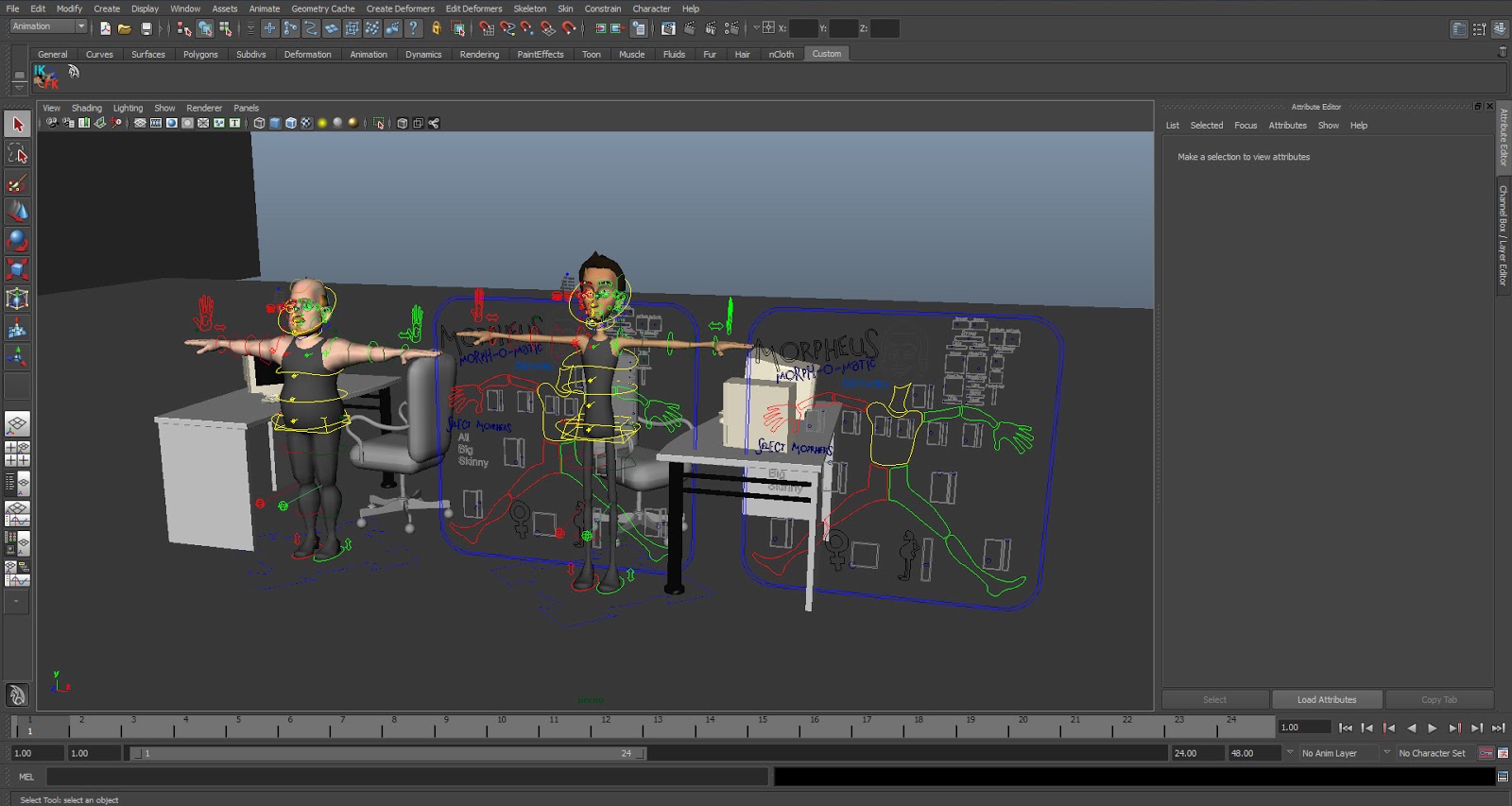
For my double acted piece I chose to use the Morphy rig created by Josh Burton as it's a very flexible rig and I've used it in the past so I'm familiar with the controls. After tweaking the two rigs to my liking in separate files, I referenced them into my scene file which I've populated with prop models from sites such as Turbosquid and Creative Crash.
 I wanted to keep the chairs as separate objects, so that I can animate a little bit of bounce in the seat separate from the base when a character sits in or gets out of a chair. To do this I simply set up a parent constraint so that I can still control the chair as a whole when moving or rotating it in the scene, but which I can turn off when need be.
 When I came to animated my blockout of the scene I came across a problem, my audio clip wouldn't play in Maya, despite the fact that it was a wav and appeared to have the right settings. I found a replacement online to use instead, this too was a wav, but for some reason this one played fine in Maya.

Thursday, 18 April 2013
Lighting: Skyboxes
So for my lighting project I need a background or a skymap for the sky. For the corresponding scene in Unity we're using a cubemap, so Ruth sent me the texture files as then the cinematic would match up more with the gameplay environment. However cubemaps can only be viewed correctly from fixed camera angles, and this presented a problem as each scene contained multiple camera angles.

As seen in the picture above, I attempted to add the cubemap textures to an envcube material in Maya, but unless lined up correctly the illusion was ruined, and when rendered the cube's seams showed up.
I looked into a few workarounds for this, and found that a cubemap could be transformed into a spherical image in HDRshop and then applied in Maya using the image based lighting environment option. However this required a lot of manual work and the end result would not be worth it compared to simply using a suitable image to begin with. With this in mind I looked online for a an image I could use as a skydome, which is a half sphere that surrounds the scene. However using a skydome can create more problems, as if all of the settings are not calibrated correctly the skydome can end up casting unwanted shadows on the scene or interfering with final gather.
After considering these options I've decided to simply use a background plate attached to each camera, or to add the sky image after rendering in After Effects. This means that the cinematics won't match up with game environments as well as I'd hoped, but considering the differences in lighting and assets anyway this is the best option as it'll allow me more time to tweak the lights and render settings.

As seen in the picture above, I attempted to add the cubemap textures to an envcube material in Maya, but unless lined up correctly the illusion was ruined, and when rendered the cube's seams showed up.
I looked into a few workarounds for this, and found that a cubemap could be transformed into a spherical image in HDRshop and then applied in Maya using the image based lighting environment option. However this required a lot of manual work and the end result would not be worth it compared to simply using a suitable image to begin with. With this in mind I looked online for a an image I could use as a skydome, which is a half sphere that surrounds the scene. However using a skydome can create more problems, as if all of the settings are not calibrated correctly the skydome can end up casting unwanted shadows on the scene or interfering with final gather.
After considering these options I've decided to simply use a background plate attached to each camera, or to add the sky image after rendering in After Effects. This means that the cinematics won't match up with game environments as well as I'd hoped, but considering the differences in lighting and assets anyway this is the best option as it'll allow me more time to tweak the lights and render settings.
Wednesday, 17 April 2013
Lighting: Scene set up
When I first received the scene with the cameras set up from Hollie, none of the textures showed up as they were linked to a harddrive on another computer. I started to manually relink all of the textures, however this caused another problem as some of the files had the same filename. This led to Maya trying to fix some of the broken links for me once I had relinked one, and I ended up with the dragon textures on the trees.


In order to get over this problem I renamed the textures with clashing names and saved all of the files used in the scene to a new directory. I then set the project in Maya so that when the scene file is opened on another computer Maya will open the texture files from the scene directory rather than from the original pathname.


Friday, 12 April 2013
Business: Ultimate Image

As another submission for the business module I had to create an 'ultimate image', which is like a promotional poster to demonstrate my skills and abilities. I struggled with this project to start with as I didn't have any ideas to show my skills as an animator in a still format. After looking at a great deal of film posters and album artwork I was inspired by posters that featured reflections as part of their design. Although I explored a few variations on this idea, I didn't really experiment with any other formats, which perhaps I should of done.
However I'm very happy with the outcome of my ultimate image, by showing the rig controls and the thumbnails reflected in the ink wash below it's clear that I'm an animator and not a rigger or modeler. I chose blue to correspond with my business card and the ink backdrop as a lot of my graphics work in college featured this effect and it's something I enjoy doing. I also think the layout works well as I carefully laid out the different elements of the design with diagonals and the rule of thirds in mind. The only possible improvements I can think of are on the renders themselves, the posing could be tweaked further and the colour balance improved but overall I think it's a solid design.
Sunday, 17 March 2013
Business: Industry review
As a part of the business studies module I also have to do an industry review on five companies I'd like to work for. So this is basically a list of games developers that I admire for various reasons as I'd really like to go into the games industry when I finish uni. It's by no means a comprehensive list as there are dozens of companies out there producing amazing work that I admire.
Rockstar North
Rockstar has studios worldwide, however the studio I'm talking about specifically is the one based in Edinburgh. An animator from Rockstar came in to give us a guest lecture in our second year and that's what sparked my interest in the company. I haven't played many of their games due to being too young when a lot of them were released, but I'm enjoying Red Dead Redemption and am looking forward to the new GTA.
Valve
Valve is headquartered in Bellevue, Washington, and is possibly my favourite developer on this list. In my opinion they've never released a bad title and the games Portal, Half Life, Team Fortress 2 to name but a few are amongst my all-time favourites. The reason for the level of quality found in their games can be attributed to Valve's artistic integrity, they will never compromise on quality even if it means pushing back a game's release date because they are committed to the end product. The company is also responsible for creating the Steam digital distribution system, which allows users worldwide to purchase games from a wide catalogue, from the latest AAA title to an independently produced game from smaller studios.
Naughty Dog
Based in Santa Monica, California, Naughty Dog are responsible for creating two series that I cherish from my childhood, namely Crash Bandicoot and Jak & Daxter. What I admire most about the company is that they recognise when it's time to move on to a new IP. Each series they've worked on only has a few games made before they move onto something fresh. It's this dedication to quality rather than profit that I find inspiring, as Naughty Dog could have continued to profit off of the Uncharted series by making more games and relying on the series' reputation to sell more units, however instead they chose to focus on making another new IP. This new game, The Last Of Us, is due out this year and judging by the trailers and behind the scenes footage released thus far it seems set to follow in the footsteps of the company's past games in terms of quality.
Rockstar North
Rockstar has studios worldwide, however the studio I'm talking about specifically is the one based in Edinburgh. An animator from Rockstar came in to give us a guest lecture in our second year and that's what sparked my interest in the company. I haven't played many of their games due to being too young when a lot of them were released, but I'm enjoying Red Dead Redemption and am looking forward to the new GTA.
Ubisoft Reflections
Again Ubisoft have studios worldwide, but it is their Reflections studio based in Newcastle that I'm interested in at the present. What I find impressive about Ubisoft's workflow is the fact that their studios collaborate on a game simultaneously, which must take a lot of work and organisation. This is how they produced the majority of the games in the Assassin's Creed series, one of my favourite series of current gen games. The same strategy is being used to produce one of their latest titles, Watch Dogs, which from the current trailers and gameplay footage is shaping up to be something pretty exciting. However it's not these games, but the original Rayman that initiated my interest in the studio, as it is one of my favourite childhood games.
Again Ubisoft have studios worldwide, but it is their Reflections studio based in Newcastle that I'm interested in at the present. What I find impressive about Ubisoft's workflow is the fact that their studios collaborate on a game simultaneously, which must take a lot of work and organisation. This is how they produced the majority of the games in the Assassin's Creed series, one of my favourite series of current gen games. The same strategy is being used to produce one of their latest titles, Watch Dogs, which from the current trailers and gameplay footage is shaping up to be something pretty exciting. However it's not these games, but the original Rayman that initiated my interest in the studio, as it is one of my favourite childhood games.
Media Molecule
I wasn't expecting to love the LittleBigPlanet games half as much as I did, but they drew me in with their charm and addictive gameplay. Based in Guildford, Media Molecule has the appearance and ideology of a small, friendly company despite producing such a bestselling series. They are currently working on a game called Tearaway, amongst other projects, which looks to be as innovative as LittleBigPlanet.
I wasn't expecting to love the LittleBigPlanet games half as much as I did, but they drew me in with their charm and addictive gameplay. Based in Guildford, Media Molecule has the appearance and ideology of a small, friendly company despite producing such a bestselling series. They are currently working on a game called Tearaway, amongst other projects, which looks to be as innovative as LittleBigPlanet.
Valve is headquartered in Bellevue, Washington, and is possibly my favourite developer on this list. In my opinion they've never released a bad title and the games Portal, Half Life, Team Fortress 2 to name but a few are amongst my all-time favourites. The reason for the level of quality found in their games can be attributed to Valve's artistic integrity, they will never compromise on quality even if it means pushing back a game's release date because they are committed to the end product. The company is also responsible for creating the Steam digital distribution system, which allows users worldwide to purchase games from a wide catalogue, from the latest AAA title to an independently produced game from smaller studios.
Naughty Dog
Based in Santa Monica, California, Naughty Dog are responsible for creating two series that I cherish from my childhood, namely Crash Bandicoot and Jak & Daxter. What I admire most about the company is that they recognise when it's time to move on to a new IP. Each series they've worked on only has a few games made before they move onto something fresh. It's this dedication to quality rather than profit that I find inspiring, as Naughty Dog could have continued to profit off of the Uncharted series by making more games and relying on the series' reputation to sell more units, however instead they chose to focus on making another new IP. This new game, The Last Of Us, is due out this year and judging by the trailers and behind the scenes footage released thus far it seems set to follow in the footsteps of the company's past games in terms of quality.
Sunday, 3 March 2013
Production: Summary
The work I did for the pre production module feeds directly into the production module I'll be focusing on until the end of the year. Since most of my posts with be about this module I figured it would be a good idea to post a brief summary first to explain what I'm working on.
Production, or major project as the module is sometimes called, is a submission consisting of four main components. Two of these components must be collaborative projects with other students or industry, and each one is usually specific to the student's chosen pathway. For example, a modeler might model and texture a character as one project, and an animator may choose to rig a character or produce a piece of animation as one project's worth of work.
For my major project work I'm producing three pieces of collaborative work on the game Echoes with my classmates, and one personal project.
Creative Creature
This project consists of 15-20 seconds of animation to be used in game on the dragon character created by Ruth Beresford and rigged by Joe Hornsby.
Bodymechanics
Again this project is 15-20 of game animations, this time for the fae and centaur characters made by Dean Paupe and rigged by Joe and Matt Watson respectively.
Advanced Lighting
For this project I am lighting two scenes in Maya for use as game cinematics using environments created by Ruth and animations provided by Hollie Sheppard.
Double Acted
For my personal project I have taken a 15 second sound clip and I am animating a small scene between two characters to the dialogue.
Production, or major project as the module is sometimes called, is a submission consisting of four main components. Two of these components must be collaborative projects with other students or industry, and each one is usually specific to the student's chosen pathway. For example, a modeler might model and texture a character as one project, and an animator may choose to rig a character or produce a piece of animation as one project's worth of work.
For my major project work I'm producing three pieces of collaborative work on the game Echoes with my classmates, and one personal project.
Creative Creature
This project consists of 15-20 seconds of animation to be used in game on the dragon character created by Ruth Beresford and rigged by Joe Hornsby.
Bodymechanics
Again this project is 15-20 of game animations, this time for the fae and centaur characters made by Dean Paupe and rigged by Joe and Matt Watson respectively.
Advanced Lighting
For this project I am lighting two scenes in Maya for use as game cinematics using environments created by Ruth and animations provided by Hollie Sheppard.
Double Acted
For my personal project I have taken a 15 second sound clip and I am animating a small scene between two characters to the dialogue.
Subscribe to:
Posts (Atom)